




Products

Our Products

DineLogics Dashboard icon
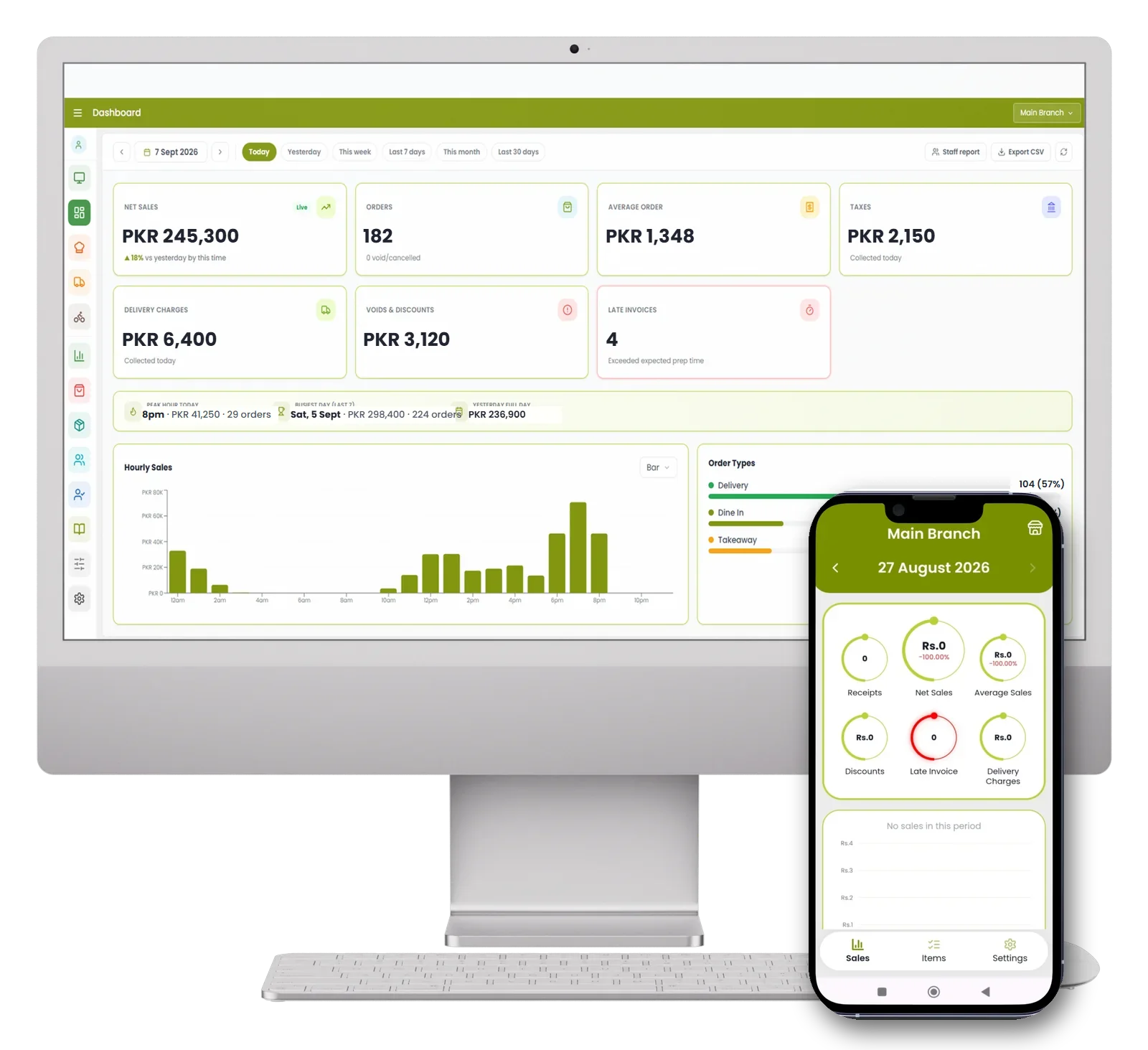
DineLogics DashboardGet instant insights into your restaurant's sales, orders, and performance from one powerful dashboard.
DineLogics POS icon
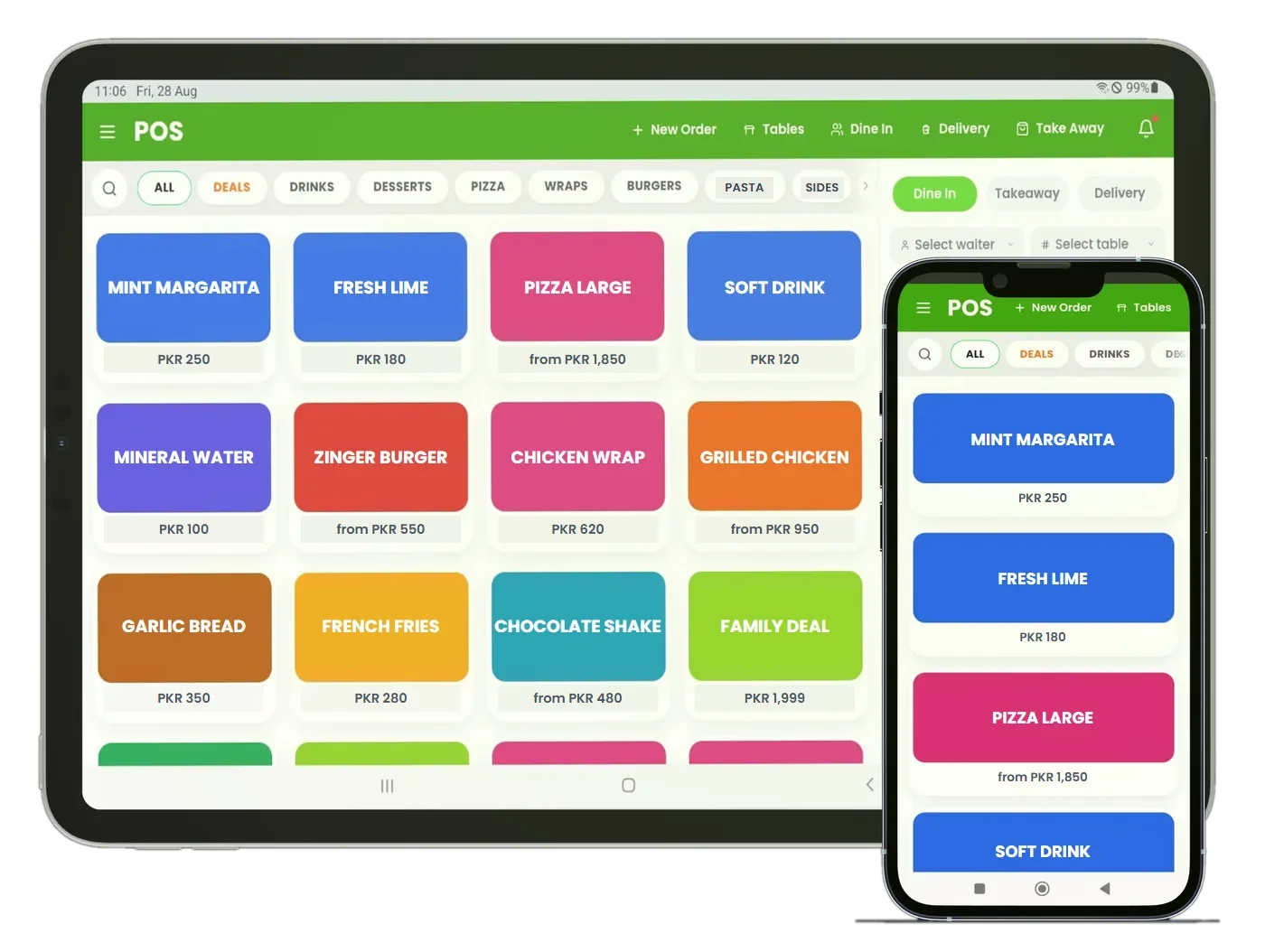
DineLogics POSManage orders, payments, and sales with a fast and easy point-of-sale system built for restaurants.
DineLogics Kitchen Display icon
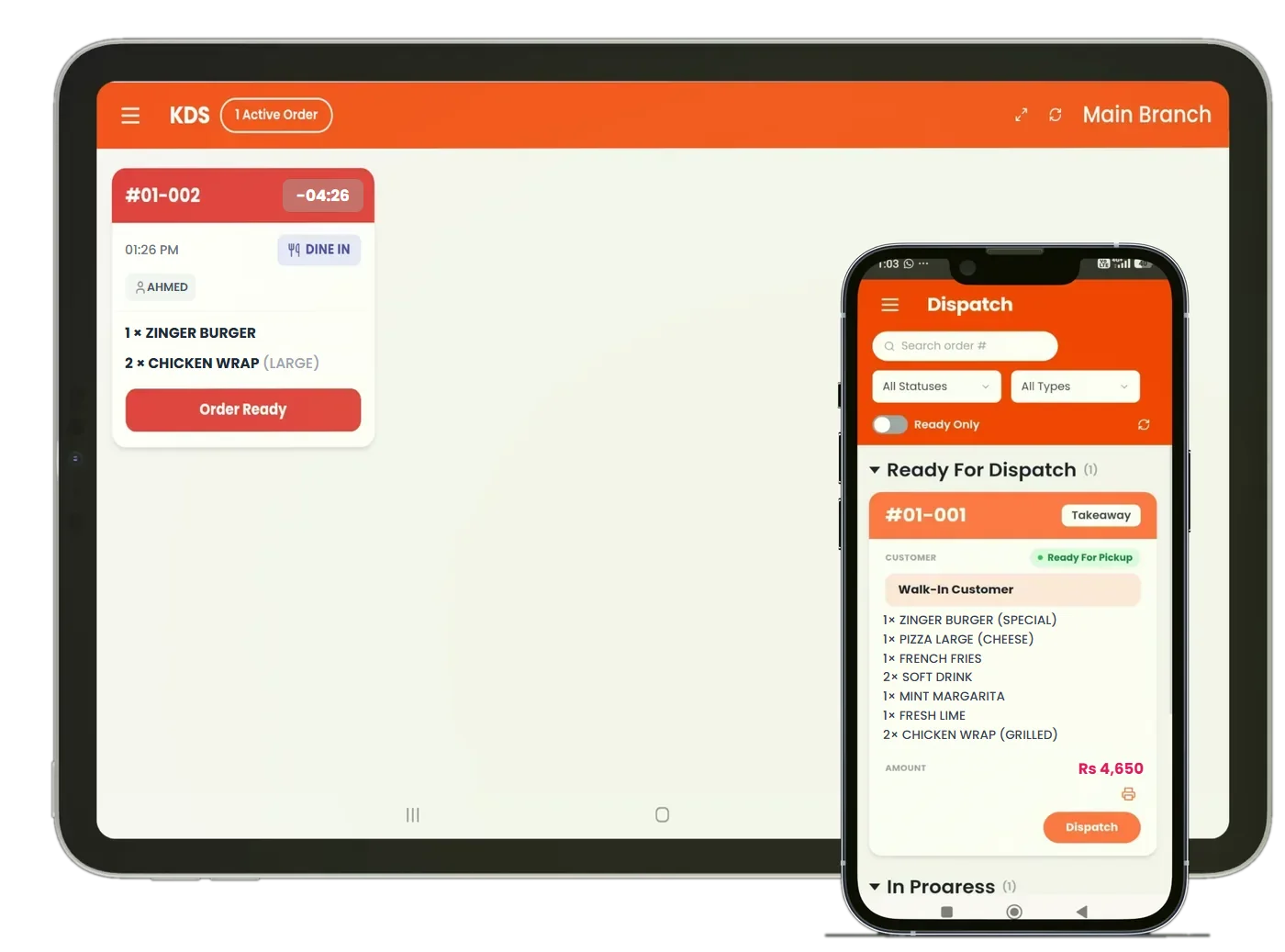
DineLogics Kitchen DisplayKeep your kitchen organized with clear, real-time order updates that help your team prepare orders faster.
DineLogics Rider icon
DineLogics RiderManage deliveries with ease, track orders in real time, and keep your riders connected with your restaurant.
DineLogics Back Office icon
DineLogics Back OfficeManage your restaurant operations, settings, and business data from one centralized back-office system.
Run Your Restaurant Smarter

DineLogics helps restaurants manage orders, inventory, kitchen operations, staff, customers, and business performance from a single intelligent platform.

DineLogics Dashboard on desktop and mobile
Point of SaleMenu ManagementKitchen DisplayDispatchRider ManagementInventoryRecipe & Food CostCustomersStaffReportsMulti-BranchOffline Mode Point of SaleMenu ManagementKitchen DisplayDispatchRider ManagementInventoryRecipe & Food CostCustomersStaffReportsMulti-BranchOffline Mode
Who we are

Restaurant people, building for restaurants

Built from experience Years of real kitchen and POS experience shaped every screen — not guesswork, not theory.
Made for how you work From a single food truck to a growing chain, DineLogics fits your service — fast, connected and reliable.
Here for the long run We set you up personally and stay with you — real people, real support, whenever you need us.
Everything you need. One platform.

Built for every part of your restaurant

Every module talks to every other one. Sell an item and stock moves. Take an order and the kitchen sees it. No exports, no double entry.

Point of Sale

Fast order entry for dine-in, takeaway and delivery. Variants, modifiers and combo deals, tuned for a real rush.

Menu Management

Build categories, items, variants and modifiers once — then set pricing and availability branch by branch.

Kitchen Display System

Orders land on the kitchen screen the moment they're punched. Bump tickets, track prep timers, keep the line moving.

Dispatch

See what's ready, what's out and what's done. Hand off orders cleanly between the kitchen, the counter and the road.

Rider Management

Assign riders, track deliveries and manage your fleet — the piece most POS systems leave out entirely.

Call Center

One call center for all your branches — take phone orders centrally and route each one to the branch that cooks and delivers it.

Inventory Management

Live stock levels, low-stock alerts, purchases and transfers — across every branch and store.

Recipe & Food Cost

Per-variant recipes and per-order-type ingredients, so a delivery box gets counted and a dine-in one doesn't — with true cost per plate.

Customer Management

Profiles, saved addresses and full order history — so repeat customers get served faster every time.

Staff Management

Accounts, roles and permissions per person. Give the kitchen the kitchen screen and nothing else.

Reports & Analytics

Sales by day, item and category. Margins, shift summaries and top sellers — a clear read on the business.

Multi-Branch Control

Run every branch from one account with its own stock, pricing and menu — fully isolated, centrally visible.

Offline Mode

Keep taking orders when the internet drops. Everything queues locally and syncs the moment you're back online.

Products

Our Products

One account, five apps — each built for a different corner of your restaurant.

DineLogics Dashboard icon
DineLogics DashboardGet instant insights into your restaurant's sales, orders, and performance from one powerful dashboard.
DineLogics POS icon
DineLogics POSManage orders, payments, and sales with a fast and easy point-of-sale system built for restaurants.
DineLogics Kitchen Display icon
DineLogics Kitchen DisplayKeep your kitchen organized with clear, real-time order updates that help your team prepare orders faster.
DineLogics Rider icon
DineLogics RiderManage deliveries with ease, track orders in real time, and keep your riders connected with your restaurant.
DineLogics Back Office icon
DineLogics Back OfficeManage your restaurant operations, settings, and business data from one centralized back-office system.
Point of Sales

  • Dine-in, takeaway and delivery on one screen
  • Tables and floors, settle straight from the table
  • Variants, modifiers, deals and combos
  • Held orders and split payment
  • Waiter and rider assignment on the order
  • Customer lookup with purchase history inline
  • Cash, card and wallet payments recorded
  • Per-device login, separate from the owner login
DineLogics Point of Sales screens
DineLogics Dashboard screens

Dashboard

  • Net sales, receipts and average sale at a glance
  • Discounts, late invoices and delivery charges tracked
  • Branch-by-branch comparison for multi-branch owners
  • Owner login is back office only — never the till
  • Check the shop from your phone, from anywhere

Kitchen System

  • Live ticket board — no printer needed
  • Orders appear the second they are sent
  • Auto-reconnect if the network blips
  • Cooking time recorded for every ticket
  • Items already sent are locked from silent removal
  • Works alongside kitchen printers if you prefer them
DineLogics Kitchen System screens
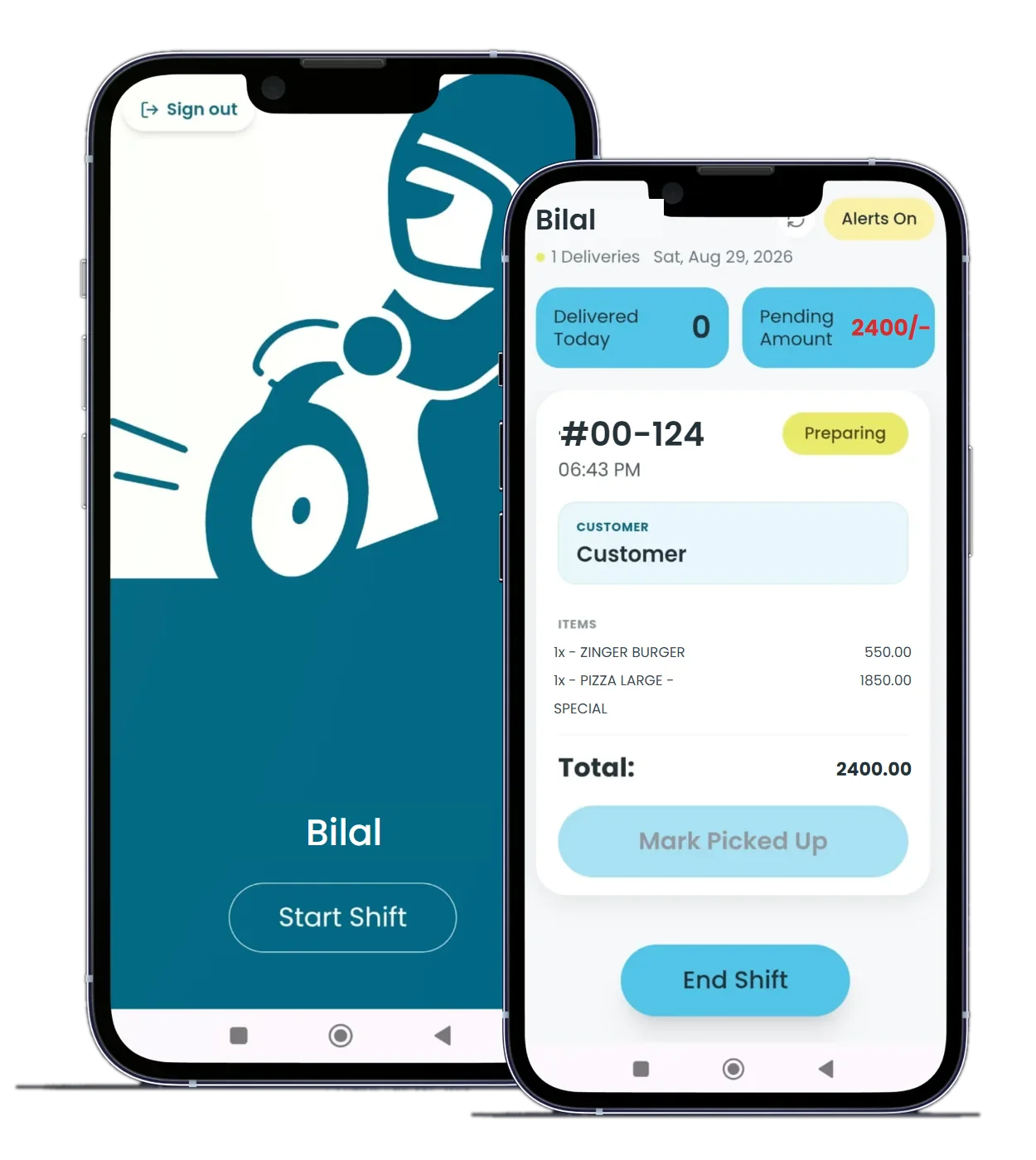
DineLogics Rider Management screens

Rider Management

  • Dispatch board showing every live delivery
  • Assign riders and track status to delivered
  • Rider shifts with a COD-locked shift end
  • Cash collected is tied to the rider and the shift
  • Delivery charges applied by rule, not by hand
  • Delivery included — not a paid add-on
Business types

Made for how you operate

From a single food truck to a multi-branch chain — DineLogics adapts to your service style.

Getting started

Live in three steps

01
Set up your menu We build your menu with you — items, variants and pricing — during guided onboarding.
02
Train in one shift An interface staff learn on the floor — no manuals, no downtime.
03
Scale to new branches Clone your setup to new branches and manage everything from one account.
Help & FAQ

Questions? We've got answers

The things restaurant owners ask us most. Can't find what you need? Reach out and a real person will help.

No special hardware required. DineLogics runs on any device with a browser — a laptop, tablet, or phone. If you already have a receipt printer or cash drawer, we'll help you connect them during setup.

DineLogics keeps working. Orders are saved on your device and sync automatically the moment your connection returns — so you never stop taking orders during a rush.

Yes. Run every branch from a single account, each with its own menu, pricing and stock — fully separated, but visible to you from one dashboard.

Most restaurants are up and running quickly. We set you up personally after your demo — building your menu, adding your team, and walking you through everything so you're ready to take orders.

Your data is yours alone. Every restaurant's information is kept completely separate, and we take regular backups so nothing is ever lost.

Your account comes with an agreed set of staff and rider logins. Need more as your team grows? Message us on WhatsApp and new IDs are active the same day.

Still need help?

Whether it's a question about a feature or a technical issue, our team is here. Message us on WhatsApp for the fastest response, or book a call.

Get started

See DineLogics live on your own menu — a 20-minute walkthrough, no commitment. We set you up personally after.

✓ Opening WhatsApp — press Send there and your request reaches us instantly.

Ready to run a smarter kitchen?

See how DineLogics brings your whole operation into one intelligent platform.

Book a Demo